Automated Hiring Assessments & Proctoring

SparkTalent by CyberSpark

A complete assessment platform that lets you evaluate any candidate — from developers to designers to operations managers — through MCQs, written tasks, video interviews, coding challenges, and QA testing. All with built-in AI proctoring.

What You Get

5 assessment types: MCQ, Essay, Video Interview, Git Coding, and QA Testing
Multi-stage pipelines — screen 500 candidates before a single interview
AI autoproctoring with face tracking, tab monitoring, and voice detection
Works for any role — tech, non-tech, leadership, operations

Outcome 1

75% fewer hours spent on manual screening

Outcome 2

4× faster time from application to offer

Outcome 3

99.2% assessment integrity confidence

Outcome 4

Seamless onboarding with CyberSpark EOR India

HOW SPARKTALENT WORKS

How SparkTalent Works

SparkTalent replaces your scattered hiring process with a single platform. Here is how your team uses it, from job posting to onboarding.

1. Post a Role

Create a career listing directly in the SparkTalent admin panel. Define the job title, description, location, and application questions. Your listing is ready in minutes — no separate job board needed.

2. Build Your Assessment

Attach a multi-stage assessment to your job posting. Each stage can contain different question categories — mix MCQs for quick knowledge screening, written essays for analytical thinking, one-way video interviews for communication and cultural fit, Git coding tasks for engineers, and QA testing on deployed apps for testers. Set a timer for each question and configure AI proctoring per stage.

3. Invite Candidates

Send branded email invitations with a single click. Need to migrate from another ATS? Import your entire candidate pipeline via JSON — names, emails, resumes, and application data transfer over cleanly. Send reminder emails to candidates who have not started yet.

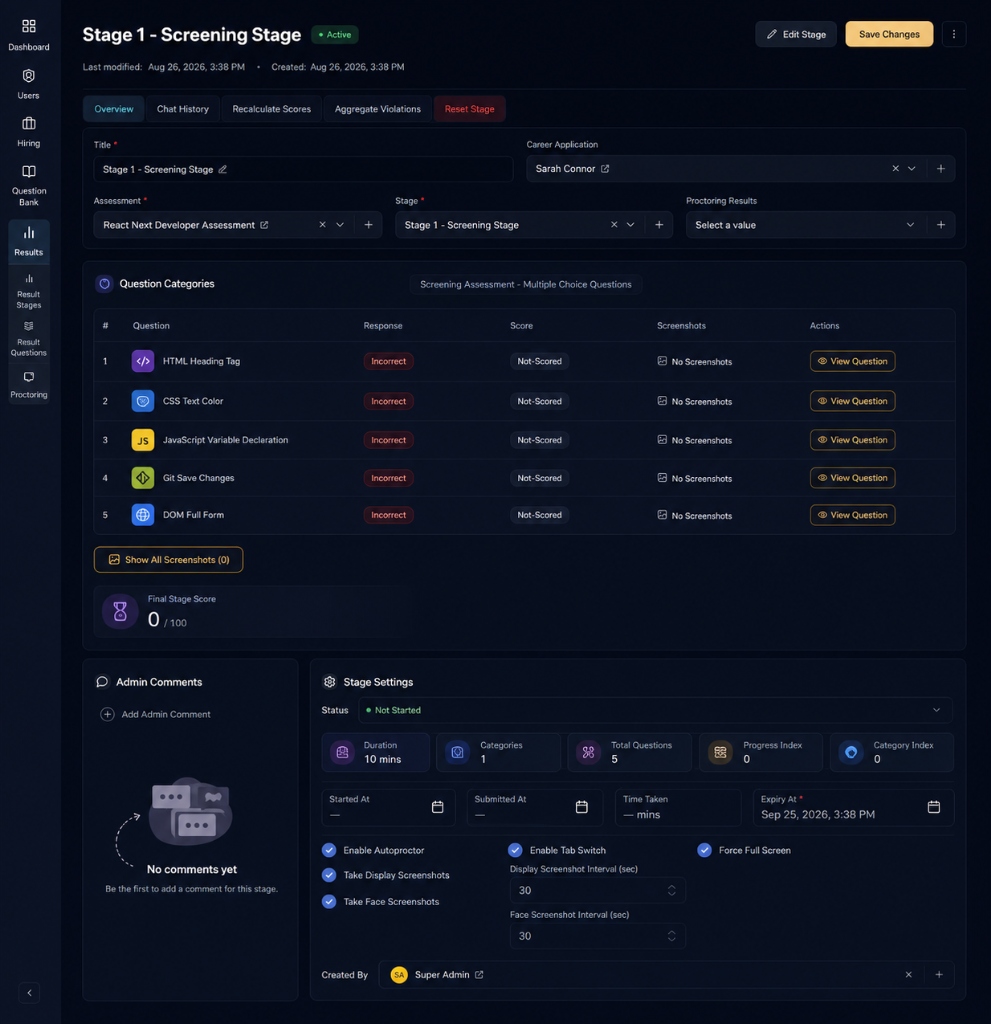
SparkTalent Admin Proctoring Hub

4. Candidates Complete the Assessment

Each candidate gets a guided tutorial walkthrough before starting. The platform handles permissions (camera, microphone, screen share) step-by-step. A countdown timer keeps every question fair, and a built-in live chat widget connects candidates to your support team if they need help.

5. Review and Score

Multiple reviewers on your team can independently score each candidate. Every score includes the reviewer's name and written reasoning, so your hiring committee has full context. View proctoring evidence, video playbacks, code commits, and written responses — all in one admin dashboard.

6. Shortlist and Onboard

Send customisable welcome emails to shortlisted candidates. If you are hiring in India, onboard pre-vetted engineers directly through Employer of Record (EOR) service — no local entity required.

and how can i upla

5 ASSESSMENT TYPES FOR EVERY ROLE

Multiple Choice (MCQ) Auto-graded knowledge screening with rich-formatted options. Best for rapid shortlisting across all roles.

Written / Essay Response Long-form answers scored against a built-in rubric to ensure consistent, unbiased evaluation for analysts and managers.

One-Way Video Interview Assess communication skills via timed, auto-saved webcam recordings that your team can review at their own pace.

Live Coding Environments Evaluate engineers using real-world Git workflows, custom coding tasks, and automated QA testing directly in the browser.

File & Portfolio Uploads Perfect for designers and architects. Candidates securely submit presentations, case studies, or architecture diagrams for review.

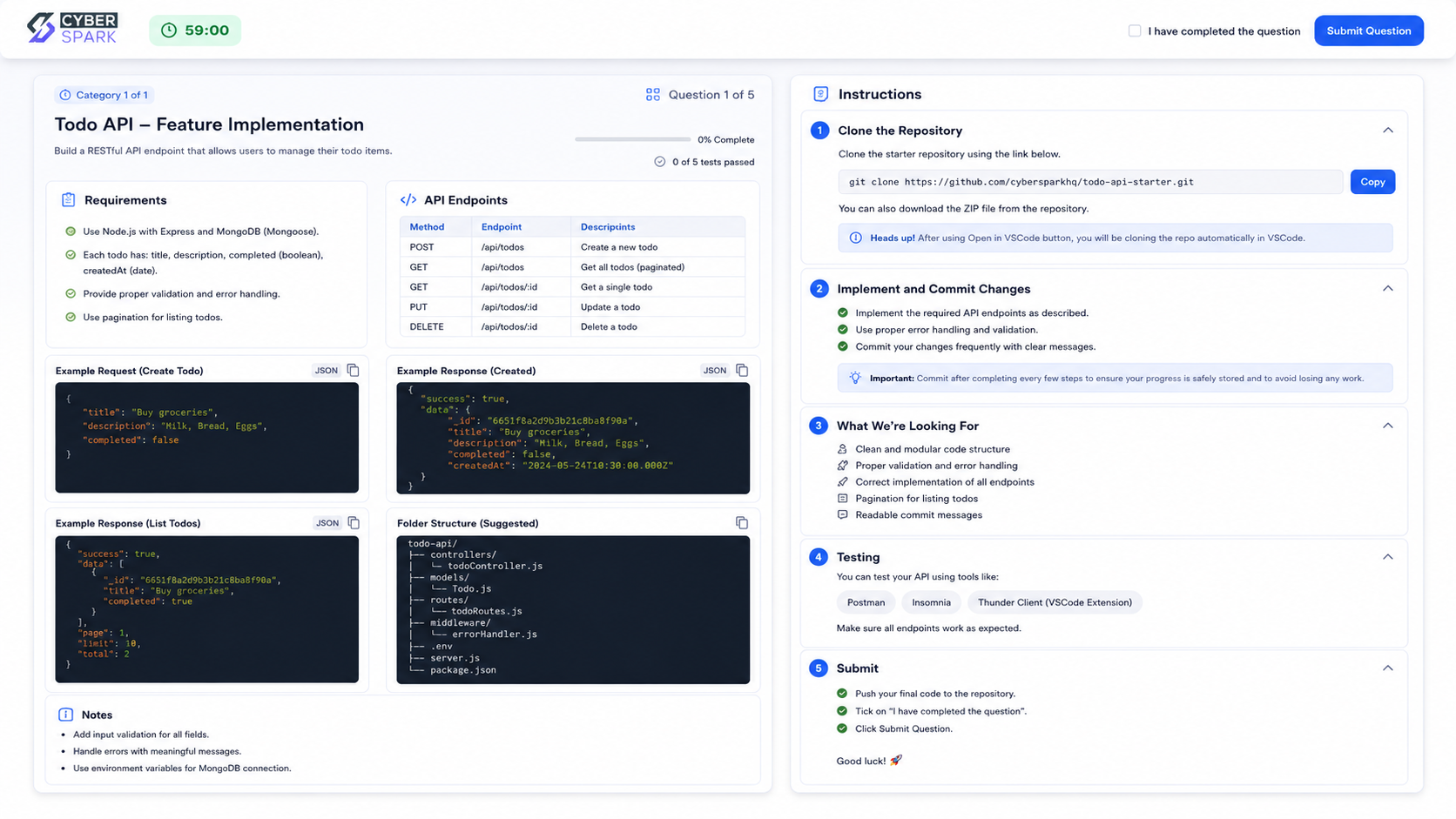
Git Repository Task

Best for software engineers and full-stack developers. Candidates clone a real Git repository directly into VS Code, write actual code, and push their commits. Your reviewers inspect the real codebase — not a synthetic puzzle on a whiteboard. Integrates with GitLab for automatic fork creation per candidate. Pre-assessed engineers can transition directly to client projects via Bespoke Software Development.

SparkTalent Live Git Assessment Engine

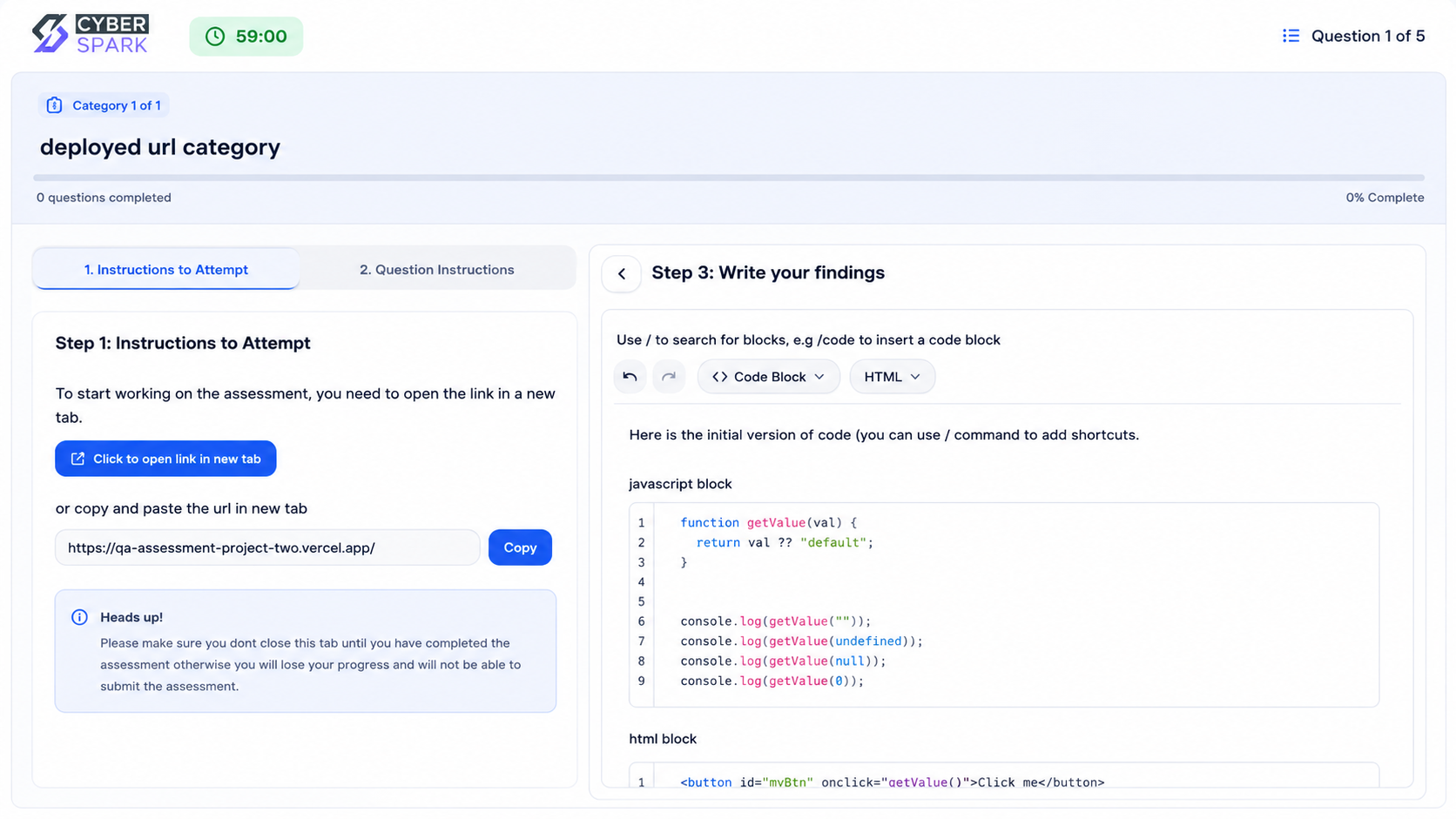
Deployed URL / QA Testing

Best for QA engineers, testers, and frontend developers. Candidates open a live staging application in their browser, explore it, find bugs, and document their findings in a rich-text editor. This tests real-world debugging skills on a real product — not hypothetical scenarios.

SparkTalent Deployed URL Testing

INTEGRITY & SECURITY

AI Autoproctoring Built In

Structured around your menu architecture, each service area has a dedicated page and clear delivery focus. Explore by capability, then dive deeper into the service that matches your outcome.

VISUAL INTEGRITY

Visual & Identity Verification

MediaPipe AI monitors the candidate's webcam throughout the assessment while SparkTalent takes periodic screenshots of their display. Every visual violation is logged with a timestamp and confidence score.

Person-in-frame detectionEncrypted snapshotsTimeline playback
Capture Reliability100%
False Positives0%
Identity Accuracy99%

Core Capabilities

Continuous Gaze Tracking

Interval-Based Screen Capture

Absence Detection

BUILT FOR HIRING TEAMS

Hiring Operations Platform

SparkTalent is not just an assessment tool — it is a complete hiring operations platform. Here is what your HR team and hiring managers get out of the box.

Seamless Operations

Bias-Reduced Scoring

Enterprise Control

Bulk Import & Export

Migrating from another ATS? Import your entire candidate pipeline via JSON upload. Names, emails, resumes, and metadata transfer cleanly. Export results whenever needed.

Multi-Reviewer Scoring

Multiple team members can independently score each candidate's response. Scores auto-average to a final number, giving your hiring committee a balanced, bias-reduced evaluation.

Email Automation

Send branded assessment invitation emails with one click. Nudge unstarted candidates with automated reminders and send customisable welcome emails directly from the admin panel.

Role-Based Access Control

Super admins, admins, and interviewers see only what they need. Field-level permissions prevent accidental edits to scores, responses, and candidate data.

Stage Reset

If a candidate experiences technical issues — a power cut, browser crash, or connectivity drop — admins can cleanly reset a specific assessment stage for retry.

Candidate Experience & Support

Reduce support load with a comprehensive public assessment guide. For everything else, a built-in live chat widget lets candidates ask questions and get real-time or queued responses during their test.

Frequently Asked Questions

Questions We're Often Asked

Practical answers on timelines, delivery models, collaboration, and support so you can move forward with confidence.

LIVE PERSONALIZED DEMO

Want To See How We Can Streamline Your Hiring?

Share your hiring priorities and constraints, and we will walk you through a personalized demo showing exactly how SparkTalent solves your evaluation challenges.

Personalized to your hiring goals

Live demonstration of AI proctoring

Actionable rollout plan included

PICK YOUR DEMO FOCUS

Technical Assessment Demo

Personalized walkthrough format

See how we evaluate engineers using real-world coding environments, Git workflows, and automated QA testing.

Custom coding tasks

Auto-evaluation rules

Code replay walkthrough

30 MIN SESSIONTECHNICAL Q&A

Demo adapts live based on your questions and goals.