LEAVE TRACKER

WorkSpace: Leave, Standups and Git Work in One Place

WorkSpace brings a software team's day into one view. Annual leave balances and holiday calendars, Google Meet standups on a shared calendar, and GitHub or GitLab branches, pull requests and issues inside work tickets. We built it for our own team first; you can host it yourself.

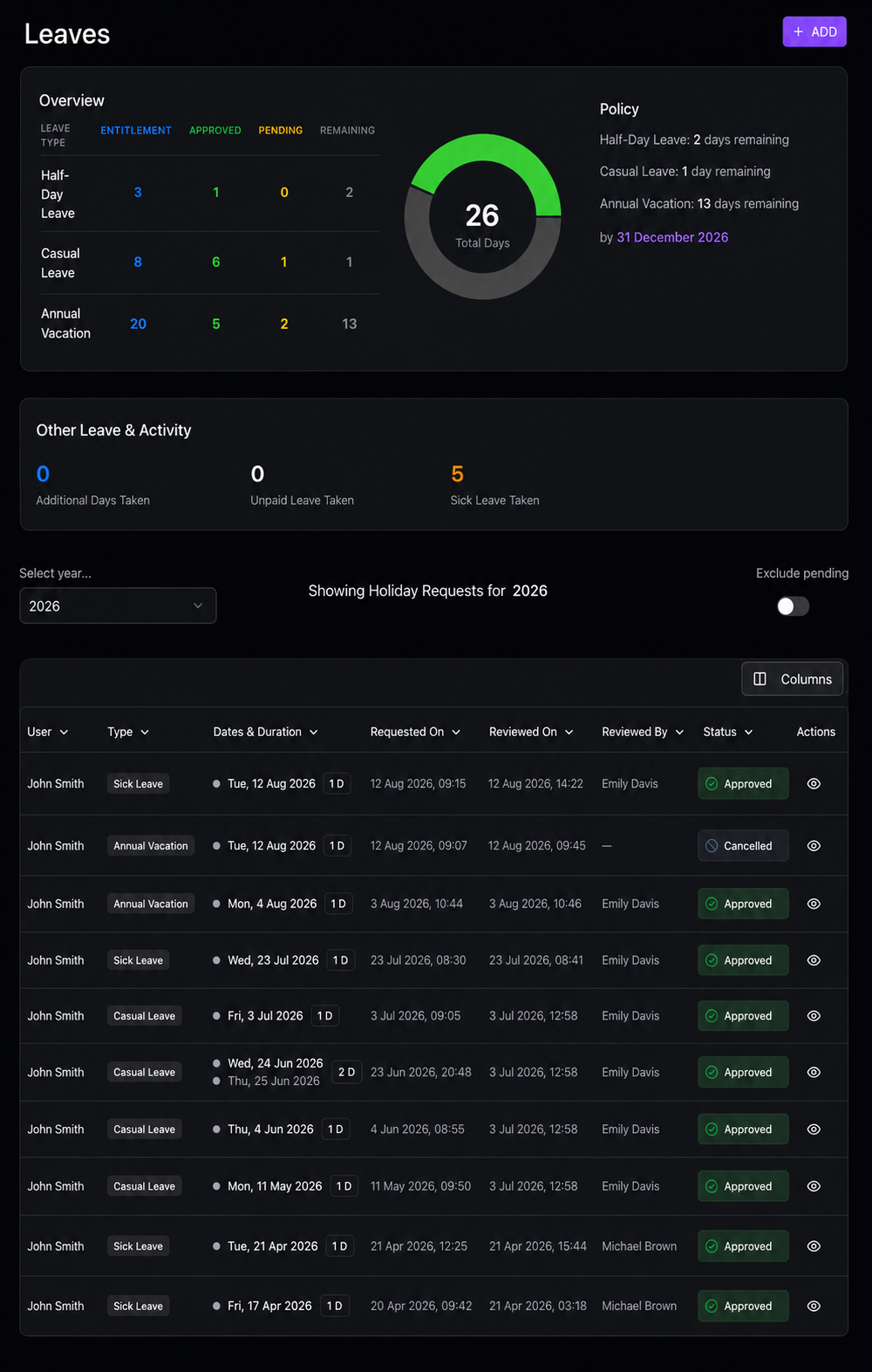
WorkSpace leave dashboard with leave balances and requests

WHY WE BUILT IT

Why We Built WorkSpace

Our engineers work across the UK and India. Before WorkSpace, a simple question such as "can we ship this on Friday?" meant checking a leave spreadsheet, two holiday calendars, a standup document and three GitHub tabs. Each tool was fine on its own; together they cost a little time from everyone, every day, and things still slipped through: a release planned on an Indian public holiday, a pull request waiting for a reviewer who was on annual leave.

WorkSpace puts those pieces in one place. It is not trying to replace your HR system or your whole project management stack. It answers the questions a software team asks every day:

  • Who is available this week, in which country, and who is on leave?
  • What did we agree in this morning's standup, and who owns each action?
  • Where is the work: which branch, which pull request, and is it waiting for review?

If your team is small, co-located and happy with a spreadsheet, you probably don't need it. It earns its place when a team spans locations, leave policies or Git repositories, and the overhead of keeping everyone in sync starts to show.

LEAVE TRACKING & HOLIDAY CALENDARS

Annual Leave Tracker with Country Holiday Calendars

A staff holiday planner that understands mixed-location teams. Each person has the right entitlement and the right public holidays, and managers see clashes before they approve.

🇬🇧 🇮🇳 🇺🇸 🇩🇪 🇸🇬
  • Annual, sick and casual leave with your own entitlements and approval rules.
  • Proration for people who join part-way through the year.
  • Public holiday calendars for the UK, India, the US, Germany and Singapore.
  • Availability view and clash warnings, so you see who is away before you plan a sprint or a release.

STANDUPS & SHARED CALENDAR

Standups and Meetings on a Shared Calendar

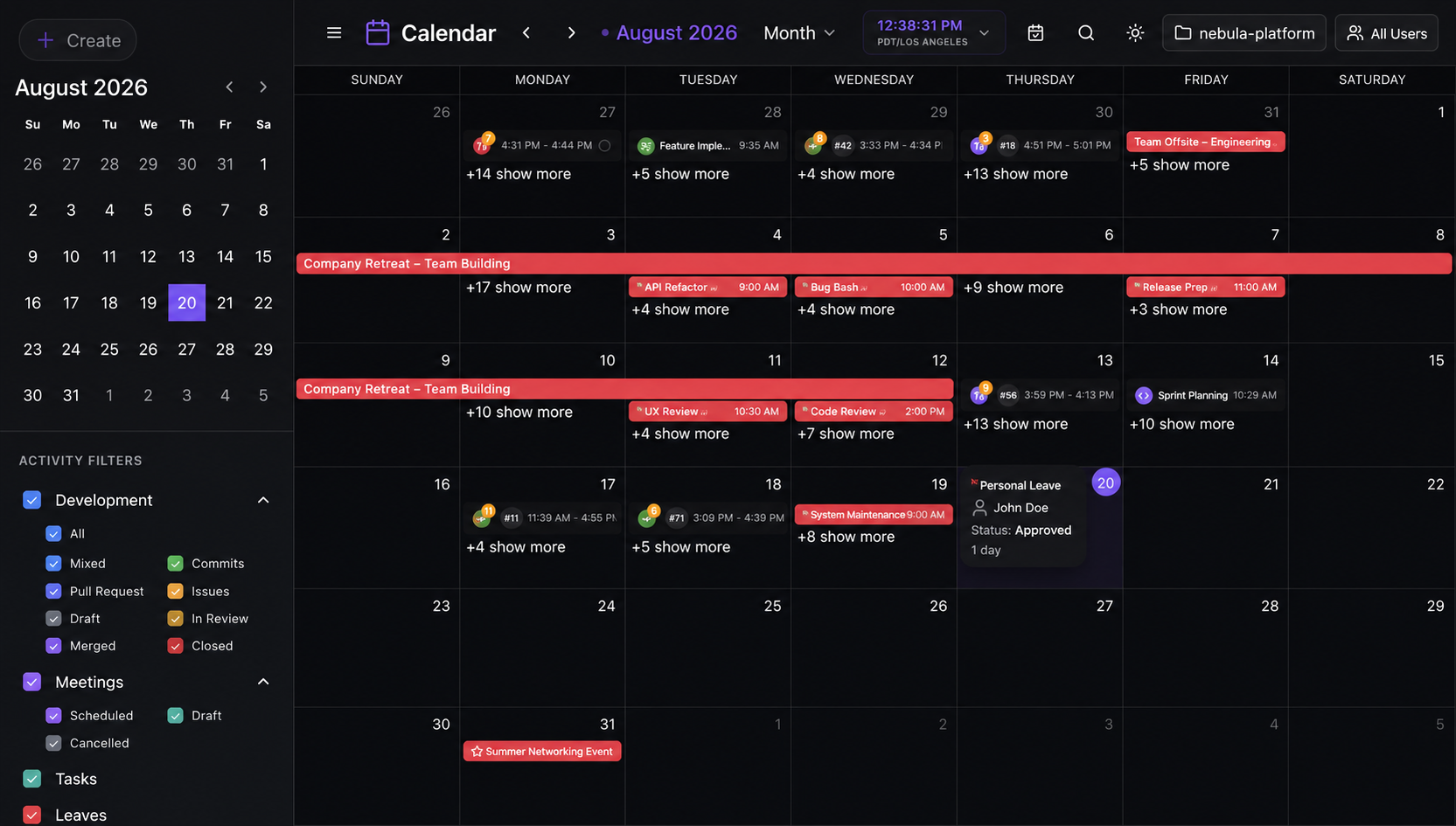
Standups work best when the agenda, the actions and the work they refer to are in the same place. WorkSpace keeps them together.

  • Google Calendar and Google Meet sync, so meetings created in either place appear in both.
  • Agendas and action items linked to the tickets they are about.
  • Filters and recurring series, so each person sees the meetings and work sessions that matter to them.
WorkSpace calendar

GIT WORK INSIDE TICKETS

GitHub and GitLab Work Inside Your Tickets

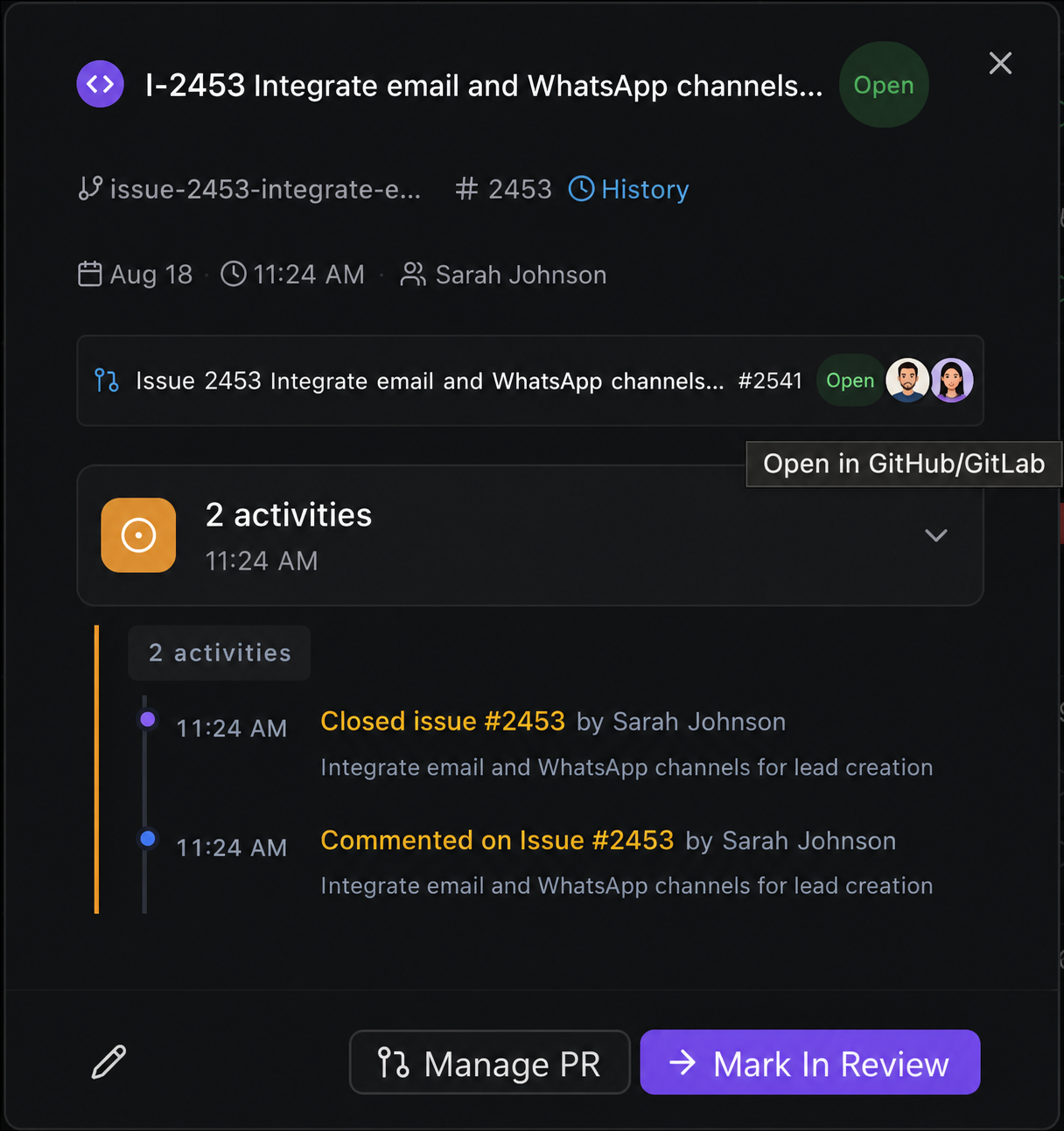
Developers lose time switching between the ticket, the repository and the pull request. In WorkSpace they can do the common Git actions without leaving the ticket.

  • Create a feature branch from a ticket after searching your GitHub or GitLab repositories.
  • Open a pull request or merge request, request reviewers and see build checks and approvals.
  • Link, assign and close issues connected to the pull request.
WorkSpace Git workflow

COMMIT SYNC & ACTIVITY

Commit Sync and Contribution Graphs

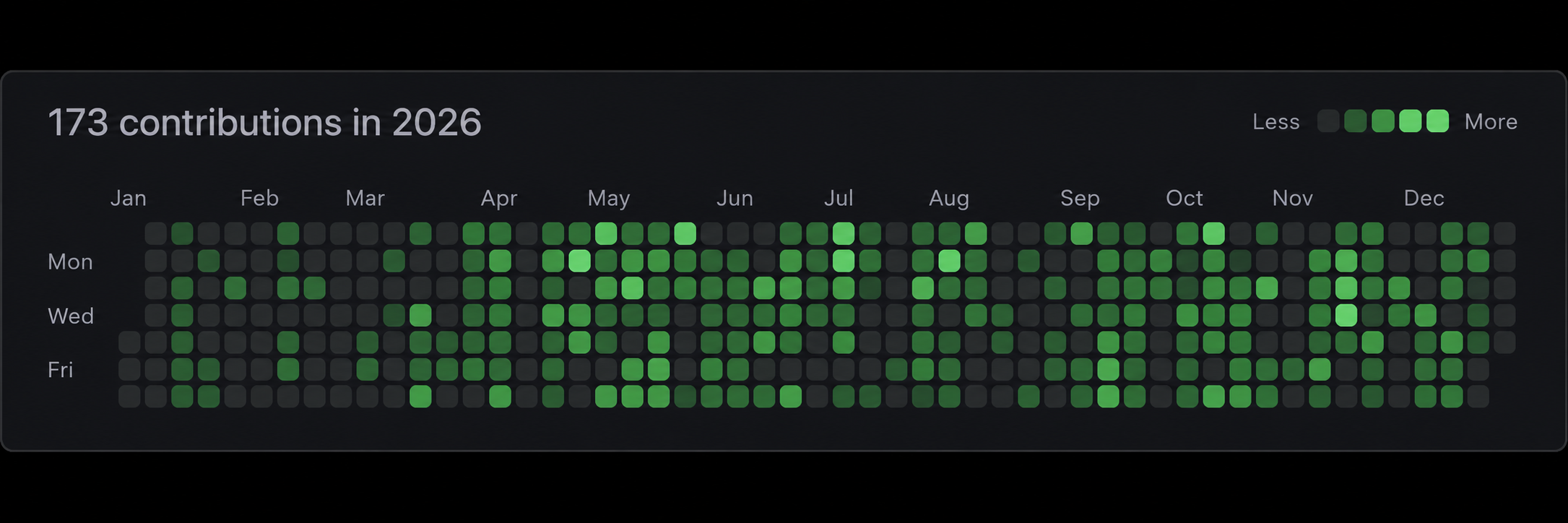
Team leads need to know how work is progressing without asking everyone for status updates. WorkSpace records Git activity automatically.

  • Webhooks from GitHub and GitLab turn pushes and pull request changes into work sessions on the calendar.
  • A sync button backfills older commits if a webhook was missed.
  • Contribution graphs and activity timelines show progress over time, so conversations are about the work rather than who looks busy.
WorkSpace Git activity heatmap

HOW IT WORKS

Getting Started in Four Steps

Most of the set-up is decisions about your own policies, not configuration. We help with each step.

Stage 01

Set Up Your Workspace

Create your workspace and project boards, invite your team and give each person a role (super admin, admin, lead or developer) so they see what they need.

Expected window: Step 1

  • Workspace and project boards created
  • Team members invited
  • Roles and permissions set

CHOOSING A LEAVE TRACKER

What to Look for in a Leave Tracker for a Software Team

Whichever tool you choose, check these before you commit. They are the things we needed ourselves.

QuestionWhy it matters
Does it handle different holiday calendars per person?A UK and India team has different bank and public holidays. One shared calendar leads to wrong balances and missed clashes.
Does it prorate entitlements?Joiners and leavers part-way through the year need the right balance without manual sums.
Can managers see clashes before approving?Approving leave without seeing who else is away is how releases end up short-staffed.
Is it close to where the work happens?If leave lives in one tool and the sprint in another, people have to remember to check both.
Where is the data held?Leave records are personal data under the UK GDPR. Self-hosting or a clear hosting location makes that easier to manage.

If your team works across the UK and India, our guide to how UK technology companies hire developers in India covers the working-together side too.

FAQ

Frequently Asked Questions About WorkSpace

Straight answers about leave tracking, standups, Git features and hosting.

Is WorkSpace an annual leave tracker or a project tool?
Both, for software teams. Leave requests, balances and holiday calendars sit alongside standups, a shared calendar and Git work in tickets, so the same view shows who is away and what is being worked on. It is not a full HR system: payroll and HR records stay in your existing tools.
Which leave types and countries does it support?
Annual, sick and casual leave, each with its own entitlement and approval rules. Balances are prorated for people who join part-way through the year. Public holiday calendars are built in for the UK, India, the US, Germany and Singapore, so mixed UK and India teams see the right days off for each person.
Can developers create branches, pull requests and issues inside WorkSpace?
Yes. Developers can search GitHub or GitLab repositories, create a feature branch, open a pull request (or GitLab merge request), request reviewers and create or close issues from inside a work ticket, without switching tabs.
How does commit sync work?
When developers push commits or open pull requests on GitHub or GitLab, WorkSpace receives the events through webhooks and records them as work sessions on the calendar. A sync button backfills older commits if a webhook was missed.
Does it work with Google Workspace?
Yes. Standups and meetings sync with Google Calendar and Google Meet, so agendas and attendance live next to the work they are about.
Is WorkSpace only for developers?
No. Developers get the Git features, but anyone can use the leave, calendar and task features. Team leads use it to plan around absences and review progress without chasing people for updates.
Can we host it ourselves?
Yes, self-hosting is available, which keeps staff and leave data on your own infrastructure. Book a demo and we'll talk through the options.
How do we get started?
Book a demo. We'll walk through your leave policy and team set-up, then help you create your workspace, connect Git and Google Calendar and import your team.

Request a Demo

See WorkSpace With Your Own Team in Mind

Book a live demo. Tell us how your team is spread across locations and how you handle leave today, and we'll show you how WorkSpace would fit.

  • Leave tracking with UK, India and other holiday calendars
  • Google Meet standups and Git work in one place
  • Self-hosting available
Book a Demo